Notist / AI assistant

An AI assistant
that understands you better than you do.

Hand it your events, to‑dos, shopping,
pantry, recipes and notes.

All features free · No ads

How the AI sees youExample

01 · Write & tidy

Ask, and it writes
and tidies up for you.

Events, to‑dos, shopping, pantry, recipes and notes. To create, edit or combine them, just ask the way you talk.

  • —Events and to‑dos together“Add the parent-teacher meeting, and a prep to‑do the day before” — in one sentence.
  • —Tidies up notesRewrites messy notes so they're easy to read, and combines overlapping notes into one.

    02 · Ahead of you

    It tells you
    before you ask.

    Today's suggestion and tonight's meal plan in the morning, and notifications for things you might forget. The AI lets you know first.
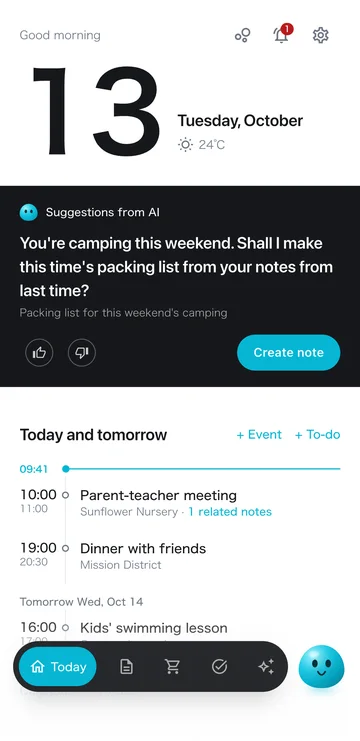
    • —Today's suggestionOne thing worth doing today, from your events, to‑dos, notes, shopping and the weather. Nothing on days without one.
    • —Tonight's meal plan1 to 4 dishes from what you have and what you like.
    • —NotificationsThe day before and just before a to‑do, the day before food you bought expires, and when you're near a store.
    1. Opening the app in the morningToday's suggestion and tonight's meal plan are there
    2. Before the 10:00 AM meetingNotes from the last meeting, under the event
    3. On the way home, near the supermarketA notification that items on your list are sold there
    4. 8:00 PMA reminder of tomorrow's to‑dos
    Today screen with a suggestion from the AI and events

    03 · Gets to know you

    Each time you use it,
    it fits you better.

    From your notes, to‑dos, events, shopping and ratings, the AI learns what you're like. It uses that in suggestions and in AI chat.

    • —See it, edit it, delete itIn “How the AI sees you,” you can even check what each item is based on.
    • —Tell it yourselfUse “Tell the AI” to share what you like and dislike.
    1. ✎Notes
    2. ✓To‑dos & events
    3. 🛒Shopping & bought
    4. 👍Ratings of suggestions & meals
    5. 🍳Meal preferences
    The AI sums it up
    How the AI sees you
    1. Used in suggestions and AI chat

    04 · Your instructions

    Your instructions change
    suggestions and meal plans.

    For today's suggestion, write what you want to see in Settings. For tonight's meal plan, make a request on the spot.
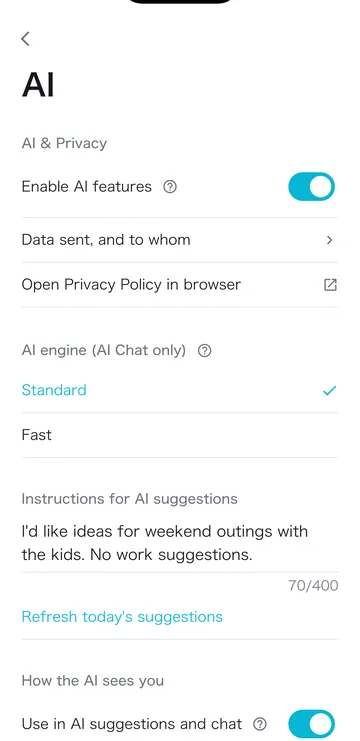
    • —Today's suggestionWrite it in “Instructions for AI suggestions” in Settings. e.g. Suggest places to go with the kids on weekends.
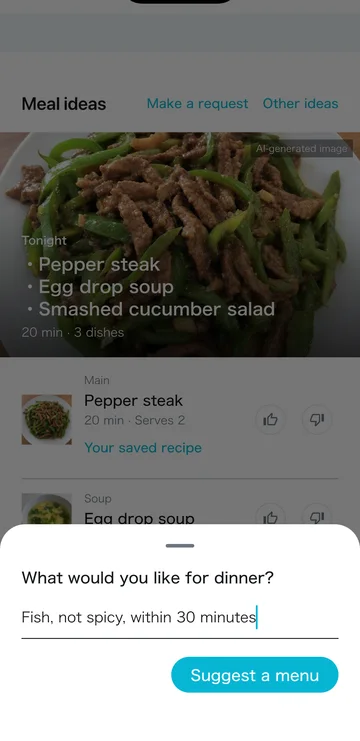
    • —Tonight's meal planUse “Make a request.” e.g. A fish dish that isn't spicy, in 30 minutes or less. You can also set recipe sites or cooks to draw from.
    • —👍 / 👎Each rating is used in future suggestions and meal plans.
    Instructions for AI suggestions in Settings
    Instructions for today's suggestion
    Making a request for the meal plan
    Requests for the meal plan

    05 · On one screen

    Your day‑to‑day,
    on one screen.

    “Today” shows the date, weather, events, to‑dos, shopping, meal plan and recent notes. Open it in the morning to see what's on today.
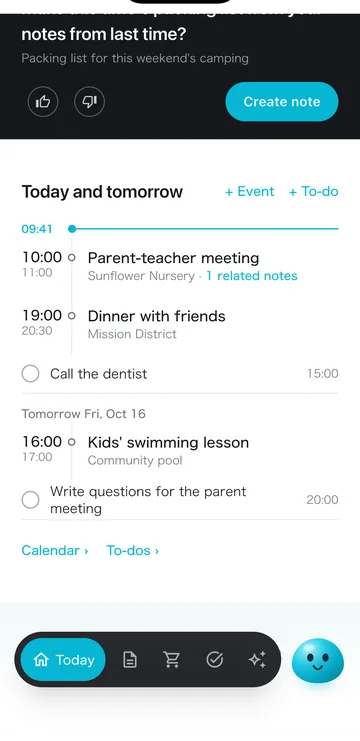
    Top of the Today screen
    Date, weather and today's suggestion
    Today's and tomorrow's events and to‑dos
    Events, to‑dos and related notes

    When it helps

    For days like these.

    1. Weekday, 7:30 AM

      Checking the day before daycare drop‑off

      1. YouOpen the app
      2. NotistNotes from the last meeting under the 10:00 AM daycare meeting. The AI asks, “Want me to make a note of what to ask at the meeting?”
      3. YouTap the suggestion's button
      4. NotistA note of questions is ready. Tonight's meal plan is there too
    2. Thursday night

      Adding next week's plans at once

      1. You“Parent-teacher meeting Tuesday at 3 PM, and a to‑do the day before to list questions”
      2. NotistCreates the event and the to‑do, and reminds you Monday at 8:00 PM
    3. Before the weekend

      Getting ready for camping

      1. You“Camping this weekend. Make a list based on my last packing note, and put what we don't have on the shopping list”
      2. NotistMakes a packing note and adds a gas canister, bug spray and marshmallows to the shopping list. Notifies you near a store
    4. Weekday, 5:00 PM

      Can't decide on dinner

      1. YouOpen the meal plan and request “a fish dish that isn't spicy”
      2. NotistSuggests fish dishes the kids can eat too. Missing ingredients go to the shopping list in one tap

    FAQ

    FAQ

    What does it do as an AI assistant?

    You can ask AI chat to create and organize events, to‑dos, grocery lists, pantry, recipes and notes. Every day it suggests what to do today and tonight's meal plan, and it reminds you about to‑dos, food expiration dates and more.

    What does “better than you do” mean?

    From the notes, to‑dos, events, shopping and ratings you add, the AI puts together what you're like and uses it in suggestions and AI chat. You can check it on screen, and edit or delete it.

    Can I choose what suggestions and meal plans include?

    For today's suggestion, use “Instructions for AI suggestions” in Settings. For tonight's meal plan, use “Make a request.” Your 👍 / 👎 ratings are also used from then on.

    Is it free?

    All features are free, with no ads. AI use has a monthly allowance; even after you use it up, tonight's meal plan and today's suggestion still arrive every day. If you use the AI a lot, the paid Plus / Pro plans give you a larger allowance.

    How is my data handled?

    Notes and lists are stored on your device, and synced to the cloud only when you sign in. We ask for your consent before you start using AI features. You can check “How the AI sees you” on screen, and edit or delete it.

    Price

    Almost every feature, free.

    Plus raises the AI allowance when you need more. No ads.

    Major update launchNov 4 – Dec 3, 2026

    Start Plus in this period andyour first 1 month is free

    For new users and current free users. After the free month, Plus renews monthly at the regular price. Cancel anytime.

    Get started with Notist

    QR code for the App Store
    iPhone
    QR code for Google Play
    Android

    Free · No ads · iOS 15+ / Android 7.0+

    More use cases